Using TL-Logbook-Dashboard
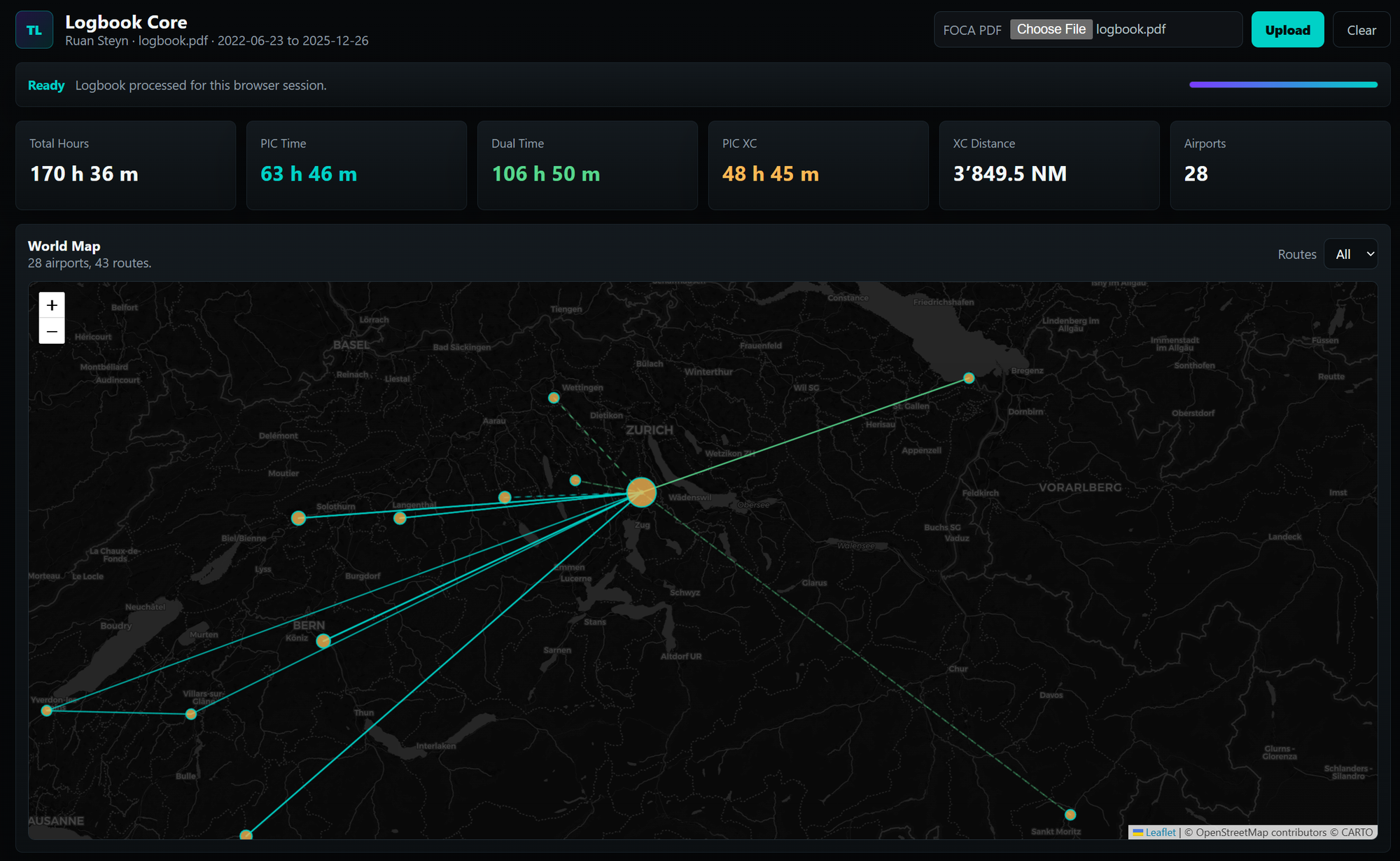
TL-Logbook-Dashboard turns a FOCA paper logbook PDF export into a private dashboard with maps, aircraft totals, registration totals, PIC time, dual time, XC time, and PIC XC time.
> Important: this is a personal analytics tool only. It is not for operational aviation, licensing, currency, recency, regulatory, insurance, or legal-record use. Always verify totals against your official logbook.
## What You Need
- A FOCA paper logbook PDF export- Access to the TL-Logbook-Dashboard page- A modern browser
## Upload Your Logbook
1. Open the TL-Logbook-Dashboard page.
2. Select your FOCA PDF in the upload control.
3. Click **Upload**.
4. Wait for the status bar to finish processing.
Your uploaded file is linked to your current browser session. Other active users do not see your data.
## Read The Dashboard
The top tiles show the core totals:
- **Total Hours** - total flight time parsed from the logbook
- **PIC Time** - logged pilot-in-command time
- **Dual Time** - logged dual instruction time
- **PIC XC** - PIC time on flights marked cross-country
- **XC Distance** - direct great-circle distance for mapped cross-country routes
- **Airports** - airports or custom airfields with known coordinates
## Use The Map
The world map shows:
- Airport markers sized by activity
- Route lines between departure and arrival points
- Route filtering for all routes, XC routes, or PIC routes
Click an airport or route for details.
## Aircraft And Registration Data
The aircraft panels show time grouped by:
- Aircraft type- Aircraft registration
Each row separates total, PIC, dual, and PIC XC time so you can quickly see where your flying time sits.
## PIC And XC Notes
The dashboard uses the FOCA export fields and remarks. A flight is treated as XC when the remarks include cross-country style text such as `Cross-Country` or `XC`.
For private strips logged as `ZZZZ`, the parser looks for remarks such as:
- `DEP: Rhino Park`
- `ARR: Roodia Aero`
- `zzzz - Roodia Aero Estate`
If a custom airfield is missing from the map, its coordinates need to be added to the app configuration.
## Clear Your Session
Click **Clear** to remove the logbook data from your active browser session.
The hosted app also expires server-side session data automatically based on the configured retention window.
## Privacy
Your uploaded logbook can contain personal aviation data. Only upload files you are allowed to process. The default app uses a necessary session cookie for isolation and does not include advertising or analytics tracking.
For legal and operator details, see:
- [Legal Notice & Privacy](/legal)
- [Techlotse Impressum](https://techlotse.cloud/impressum/)